
There’s something genuinely exciting about seeing the ZX Spectrum Next do more than run games. I love seeing developers push this machine in unexpected directions, especially when the results are genuinely useful. Nexus 1.6 is a great example. It’s a graphical desktop with windows, icons, applications, wireless file transfers and a surprisingly extensive collection of tools. And the more you discover about it, the more interesting it becomes. Developed by Shrek of MB Maniax, Nexus has reached version 1.6, with a fresh update arriving in November 2026. What began as a way to manage files has grown into a desktop environment with its own personality. You can browse folders, organise software, download games and move files between computers over Wi-Fi. It’s the sort of project I enjoy following, partly for the technical achievement, but mainly for the practical possibilities it brings to the Spectrum Next.
A proper desktop on an 8-bit computer
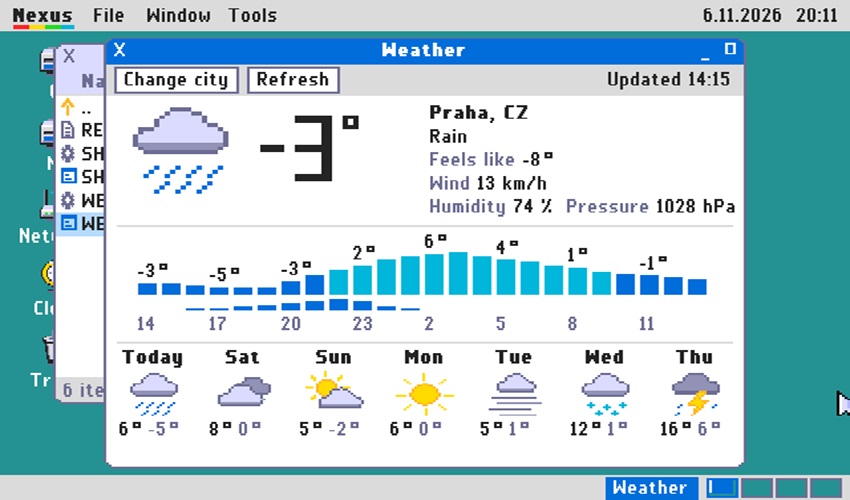
Seeing a graphical desktop running on the Spectrum Next is exciting enough. Discovering how much Nexus manages to squeeze onto the screen makes it more interesting. Running at 640 × 256 resolution, the interface includes a menu bar, clock, desktop icons and movable windows. You can open folders, arrange them across the display and switch between four separate desktops. Each desktop has its own shortcuts and windows, with miniature previews helping you switch between tasks.
Up to six folder windows can remain open simultaneously. You can arrange them side by side, snap them into position or leave them overlapping. There are light, dark and Spectrum-inspired colour schemes, plus an icon editor and 255 designs to choose from. And yes, you can use a mouse.
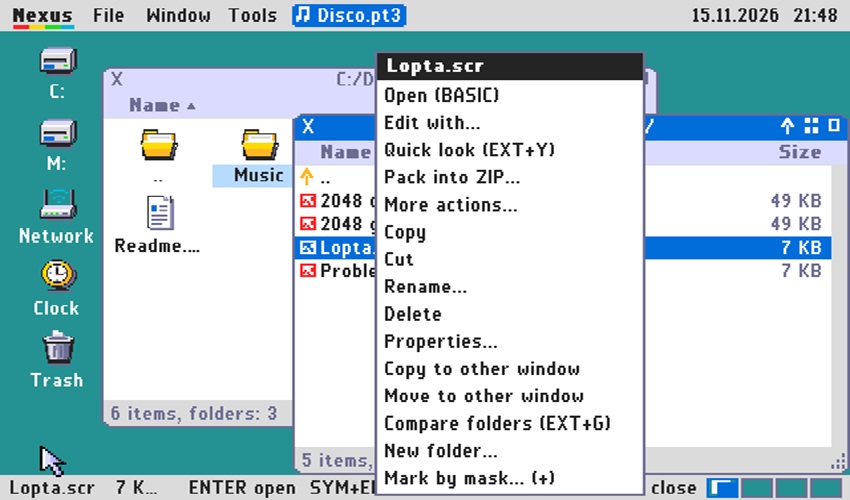
I particularly like the attention given to ordinary file management. Copying, moving, searching and sorting files works through familiar desktop controls. Drag and drop is supported, deleted files can be recovered, and there’s an undo function for correcting mistakes. Nexus can preview text documents, BASIC programs, tape files and images. There’s hexadecimal viewing too. It’s quite a collection for a computer with an 8-bit processor.
Wi-Fi file sharing is where things get interesting
Here’s the feature I’d be most excited to use. Moving files onto a Spectrum Next often means removing its SD card, connecting it to a PC, copying the files and returning it to the machine. Nexus offers a far more convenient approach.
Launch File Share and the Next becomes accessible through a browser on another device connected to the same Wi-Fi network. Enter the address displayed on the Spectrum and you can browse its storage from a PC, tablet or smartphone.
You can upload files, download programs and organise folders without removing the card. Simple. And incredibly useful. WebDAV support takes this further, letting compatible Windows, macOS and Linux file managers access the Next’s storage as a network drive. There’s a read-only option too. Nexus can transfer files between two Spectrum Next machines using its Remote Next application.
Of course, speed has its limits. Transfers between Next computers reach approximately 10 KB/s, and the ESP-01 Wi-Fi module isn’t going to compete with modern networking hardware. Still, for moving individual programs and smaller files, I’d happily take convenience over speed.
Downloading Spectrum software from the desktop
Another feature I particularly enjoy seeing is the built-in Catalog application. Instead of relying entirely on another computer to find software, Nexus lets you search a database of ZX Spectrum releases directly from the desktop. It covers software for the Spectrum Next and earlier machines, with release information and platform distinctions.
Free titles can be downloaded straight onto the SD card, and compatible programs can launch through NextZXOS. Commercial releases appear with pricing information. Some packages containing several separate files still require manual handling.
There’s more to explore beyond the catalogue. Nexus includes a text editor, hexadecimal editor, system monitor, music player, weather display, mail application and basic internet tools. Up to four applications can run in separate windows. Seeing these familiar desktop ideas operating within the Spectrum Next’s hardware limitations is part of the appeal.
Nexus 1.6 brings welcome improvements
The November update concentrates on usability. Built-in applications now appear directly in the Nexus menu, organised into categories covering internet, networking, games, music and utilities. The catalogue has received more software entries, including additional programs and demos.
File sharing has received attention, with browser uploads transferred in smaller blocks to accommodate the ESP-01 module. A 1 MB upload takes approximately two and a half minutes under reported conditions. Nexus can check for updates over Wi-Fi and install changed files, saving another round of manual file copying. Automatic startup is available too.
A project worth keeping an eye on
Nexus 1.6 requires a ZX Spectrum Next running NextZXOS 2.07 or newer. Two megabytes of RAM are recommended, and the networking functions require a configured ESP-01 module. The 1.4 MB installer comes with illustrated documentation in eleven languages, including English, French, German and Dutch. It’s available through a name-your-own-price release.
What appeals to me most about Nexus isn’t any single feature. It’s seeing so many practical ideas working together on the Spectrum Next. A desktop, a file manager, wireless transfers, software downloads and useful applications, accessible from one interface.
I love projects like this. They give you another reason to switch on the computer, explore its capabilities and see what developers have managed to achieve. And personally, I’d be delighted to stop removing the SD card every time I wanted to copy a file.
MORE AMIGA & RETRO NEWS
 Nexus Mods won’t ban AI-generated mods, but stricter rules are coming
 TheC64 and Spectrum handhelds miss 2026 launch with six month delay
 41 years of Commodore Amiga: 41 facts about the legendary computer
 New SpeccySE release improves ZX Spectrum emulation on Nintendo DS and DSi
 When Apple forced GEM to change: the forgotten battle over the PC GUI
 Why Norton Commander became a legendary MS-DOS file manager
 What was Lindows? The story of the Linux distro Microsoft took to court
 From pocket PC to Sega Dreamcast: the complete history of Windows CE
 Bonsai Next: a challenging new ZX Spectrum Next platform game
 ZX Spectrum and Commodore 64 are back: new hardware, old rivalry and a growing market
 Sega’s Sonic the Hedgehog races onto ZX Spectrum Next in fan-made beta
 Windows 3.0 vs MacOS, AmigaOS and TOS: the 1990 desktop battle that changed computing
 New Commodore 64 And ZX Spectrum handhelds launch in October 2026
 ZX Spectrum anniversary launch: Spectrum White Edition arrives April 23
 Retro gaming evolves: Evercade Nexus pushes the handheld scene forward